zh 代表本手册的中文注释版源代码目录。前言部分 有提到:
1 reply本书的所有示例代码可至 tensorflow-handbook/source/_static/code at master · snowkylin/tensorflow-handbook · GitHub 获得。其中
zh目录下是含中文注释的代码,en目录下是含英文版注释的代码。在使用时,建议将代码根目录加入到PYTHONPATH环境变量,或者使用合适的 IDE(如 PyCharm)打开代码根目录,从而使得代码间的相互调用(形如import zh.XXX的代码)能够顺利运行。
好的,找到了,谢谢~


文档中还是有一些小错误的,有的不仔细研究还挺难发现问题的。
使用传统的 tf.Session 这节中:
sess.run (sparse_categorical_accuracy.update (y_true=data_loader.test_label [start_index: end_index], y_pred=y_pred))
应该修改为
sess.run (sparse_categorical_accuracy.update_state (y_true=data_loader.test_label [start_index: end_index], y_pred=y_pred))
已经合并 pr,可能是这部分代码比较老了没有及时更新。感谢 bug fix。

1.老师,好像在附录里面没有看到关于图执行模式的深入探讨参考资料呀?麻烦确定一下~
2.如果想进一步了解学习 tensorflow 架构设计方面的知识,老师有推荐的资料吗?
如果你接手了什么 TensorFlow 1.X 开发的旧项目又无法升级的话可以学习。总之就是如果用得到(或者不得不用)就去学,否则必要不大。

这里是说在命令行参数中加入 --mode=test 并再次运行代码。也就是说,如果你之前在终端执行代码的指令是
python code.py
那么你现在应该在终端中执行
python code.py --mode=test
具体可以参考 argparse --- 命令行选项、参数和子命令解析器 — Python 3.12.0 文档
1 reply
明白了,谢谢大佬  ,终于搞明白这个 argparse 模块了
笔误已改正,感谢提醒!
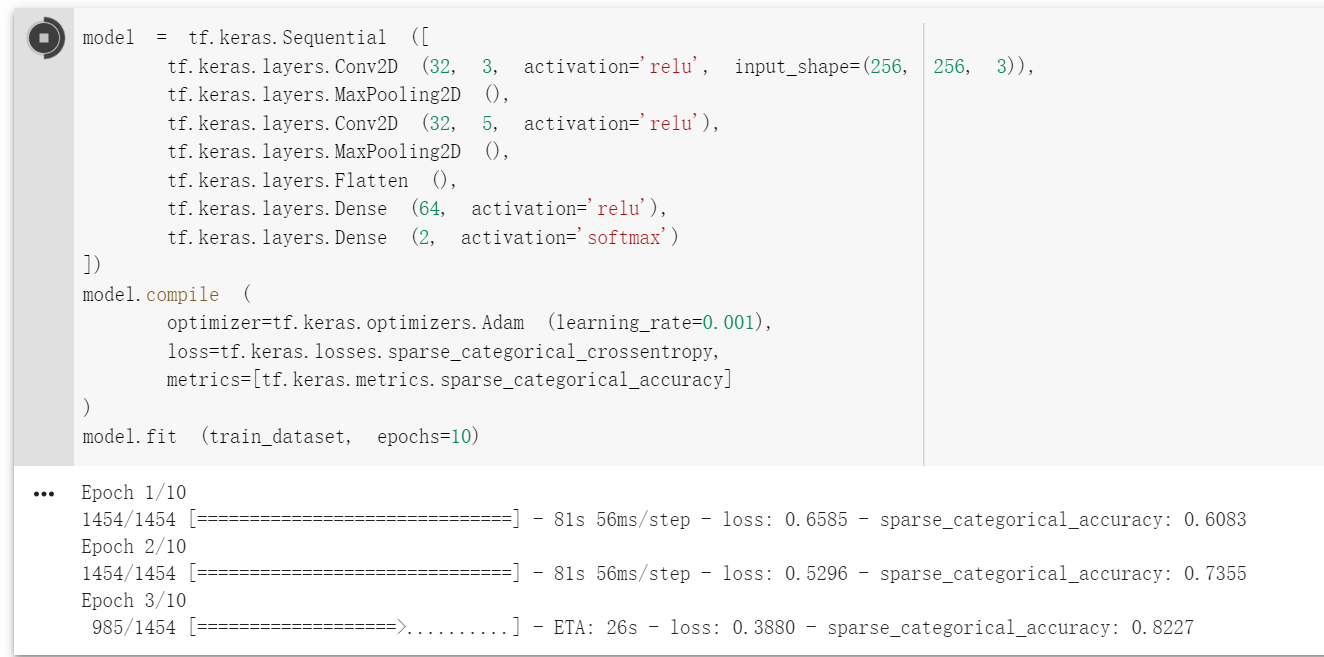
你好! 关于 cats-and-dogs 数据集,我尝试了很多模型,也尝试了文章中的模型,但是 acc 一直在 0.5,应该是完全没有训练出参数,能否帮忙看看是否是哪处 数据处理出错了?代码如下:
import tensorflow_datasets as tfds
import tensorflow as tf

dataset_name = 'cats_vs_dogs'
dataset, info = tfds.load (name=dataset_name, split=tfds.Split.TRAIN, with_info=True)
print (info)

def preprocess (features):
    image, label = features ['image'], features ['label']
    image = tf.image.resize (image, [256, 256]) / 255.0
    return image, label

train_dataset = dataset.map (preprocess).shuffle (23000).batch (32).prefetch (tf.data.experimental.AUTOTUNE)
model = tf.keras.Sequential ([
    tf.keras.layers.Conv2D (32, 3, activation='relu', input_shape=(256, 256, 3)),
    tf.keras.layers.MaxPooling2D (),
    tf.keras.layers.Conv2D (32, 5, activation='relu'),
    tf.keras.layers.MaxPooling2D (),
    tf.keras.layers.Flatten (),
    tf.keras.layers.Dense (64, activation='relu'),
    tf.keras.layers.Dense (2, activation='softmax')
])
model.compile (
    optimizer=tf.keras.optimizers.Adam (learning_rate=0.001),
    loss=tf.keras.losses.sparse_categorical_crossentropy,
    metrics=[tf.keras.metrics.sparse_categorical_accuracy]
)
model.fit (train_dataset, epochs=10)
我也尝试了用 InceptionV3 做迁移学习,效果都是 0.5,感觉是某块数据集处理上出问题,困扰了我好多天,请大佬帮忙看看,谢谢~
好像确实是因为训练集比较大,需要 GPU 跑一段时间,现在可以了,谢谢!
在请问下,为何我这边的次数是你的一半(我这边是 727,你的是 1454),一样的代码,还有有个 warning 信息能帮忙看看是啥意思吗?
Epoch 2/10
Corrupt JPEG data: 1403 extraneous bytes before marker 0xd9
Corrupt JPEG data: 65 extraneous bytes before marker 0xd9
Corrupt JPEG data: 239 extraneous bytes before marker 0xd9
Corrupt JPEG data: 228 extraneous bytes before marker 0xd9
Corrupt JPEG data: 128 extraneous bytes before marker 0xd9
Corrupt JPEG data: 214 extraneous bytes before marker 0xd9
Corrupt JPEG data: 162 extraneous bytes before marker 0xd9
Corrupt JPEG data: 99 extraneous bytes before marker 0xd9
Warning: unknown JFIF revision number 0.00
Corrupt JPEG data: 396 extraneous bytes before marker 0xd9
Corrupt JPEG data: 252 extraneous bytes before marker 0xd9
Corrupt JPEG data: 2226 extraneous bytes before marker 0xd9
Corrupt JPEG data: 1153 extraneous bytes before marker 0xd9
727/727 - 31s - loss: 0.6006 - sparse_categorical_accuracy: 0.6799
因为我把 batch_size 设成了 16(size 越小,batch 数量越多,每次计算消耗的计算资源和内存越小)。
warning 信息代表数据集里面的个别图片数据读取失败,见 TensorFlow 模型建立与训练 - #25 by slyrx 中 @slyrx 的提问及回答。
1 reply
好的,谢谢啦!

一处笔误:TFRocrdDataset -> TFRecordDataset

老师,请问我根据您的代码跑下来后,在终端运行 tensorboard --logdir=./tensorboard,只能显示出 scalars 的图,Graphs 和 Profile 都无法可视化,有解决方法吗?
1 reply
请贴一下你写的代码
老师您好,我在运行 cats_vs_dogs 图像分类时,显示 UnicodeDecodeError: ‘utf-8’ codec can’t decode byte 0xd5 in position 150: invalid continuation byte,是为什么?我的代码如下:
num_epochs = 10
batch_size = 32
learning_rate = 0.001
data_dir = 'E:\datasets\cats_vs_dogs'
train_cats_dir = data_dir + '/train/cats'
train_dogs_dir = data_dir + '/train/dogs'
test_cats_dir = data_dir + '/valid/cats'
test_dogs_dir = data_dir + '/valid/dogs'

def _decode_and_resize (filename,label):
    image_string = tf.io.read_file (filename)
    image_decoded = tf.image.decode_jpeg (image_string)
    image_resized = tf.image.resize (image_decoded,[256,256]) / 255.0
    return image_resized,label

if __name__ == '__main__':
    train_cat_filenames = tf.constant ([train_cats_dir + filename for filename in os.listdir (train_cats_dir)])
    train_dog_filenames = tf.constant ([train_dogs_dir + filename for filename in os.listdir (train_dogs_dir)])
    train_filenames = tf.concat ([train_cat_filenames,train_dog_filenames],axis=-1)
    train_labels = tf.concat ([
        tf.zeros (train_cat_filenames.shape,dtype=tf.int32),
        tf.ones (train_dog_filenames.shape,dtype=tf.int32)],
        axis=-1)

    train_datasets = tf.data.Dataset.from_tensor_slices ((train_filenames,train_labels))
    train_datasets = train_datasets.map (
        map_func=_decode_and_resize,
        num_parallel_calls=tf.data.experimental.AUTOTUNE)
    train_datasets = train_datasets.shuffle (buffer_size=23000)
    train_datasets = train_datasets.batch (batch_size)
    train_datasets = train_datasets.prefetch (tf.data.experimental.AUTOTUNE)

    model = tf.keras.Sequential ([
        tf.keras.layers.Conv2D (32, 3, activation='relu', input_shape=(256, 256, 3)),
        tf.keras.layers.MaxPooling2D (),
        tf.keras.layers.Conv2D (32, 5, activation='relu'),
        tf.keras.layers.MaxPooling2D (),
        tf.keras.layers.Flatten (),
        tf.keras.layers.Dense (64, activation='relu'),
        tf.keras.layers.Dense (2, activation='softmax')
    ])

    model.compile (
        optimizer=tf.keras.optimizers.Adam (learning_rate=learning_rate),
        loss=tf.keras.losses.sparse_categorical_crossentropy,
        metrics=[tf.keras.metrics.sparse_categorical_accuracy]
    )

    model.fit (train_datasets, epochs=num_epochs)
是最后一行 model.fit (train_datasets, epochs=num_epochs),错误提示是这样的:
1 replyUnicodeDecodeError Traceback (most recent call last)
in
48 )
49
—> 50 model.fit (train_datasets, epochs=num_epochs)~\Anaconda3\lib\site-packages\tensorflow_core\python\keras\engine\training.py in fit (self, x, y, batch_size, epochs, verbose, callbacks, validation_split, validation_data, shuffle, class_weight, sample_weight, initial_epoch, steps_per_epoch, validation_steps, validation_freq, max_queue_size, workers, use_multiprocessing, **kwargs)
817 max_queue_size=max_queue_size,
818 workers=workers,
→ 819 use_multiprocessing=use_multiprocessing)
820
821 def evaluate (self,~\Anaconda3\lib\site-packages\tensorflow_core\python\keras\engine\training_v2.py in fit (self, model, x, y, batch_size, epochs, verbose, callbacks, validation_split, validation_data, shuffle, class_weight, sample_weight, initial_epoch, steps_per_epoch, validation_steps, validation_freq, max_queue_size, workers, use_multiprocessing, **kwargs)
340 mode=ModeKeys.TRAIN,
341 training_context=training_context,
→ 342 total_epochs=epochs)
343 cbks.make_logs (model, epoch_logs, training_result, ModeKeys.TRAIN)
344~\Anaconda3\lib\site-packages\tensorflow_core\python\keras\engine\training_v2.py in run_one_epoch (model, iterator, execution_function, dataset_size, batch_size, strategy, steps_per_epoch, num_samples, mode, training_context, total_epochs)
126 step=step, mode=mode, size=current_batch_size) as batch_logs:
127 try:
→ 128 batch_outs = execution_function (iterator)
129 except (StopIteration, errors.OutOfRangeError):
130 # TODO (kaftan): File bug about tf function and errors.OutOfRangeError?~\Anaconda3\lib\site-packages\tensorflow_core\python\keras\engine\training_v2_utils.py in execution_function (input_fn)
96 #numpytranslates Tensors to values in Eager mode.
97 return nest.map_structure (_non_none_constant_value,
—> 98 distributed_function (input_fn))
99
100 return execution_function~\Anaconda3\lib\site-packages\tensorflow_core\python\eager\def_function.py in call(self, *args, **kwds)
566 xla_context.Exit ()
567 else:
→ 568 result = self._call (*args, **kwds)
569
570 if tracing_count == self._get_tracing_count ():~\Anaconda3\lib\site-packages\tensorflow_core\python\eager\def_function.py in _call (self, *args, **kwds)
630 # Lifting succeeded, so variables are initialized and we can run the
631 # stateless function.
→ 632 return self._stateless_fn (*args, **kwds)
633 else:
634 canon_args, canon_kwds = \~\Anaconda3\lib\site-packages\tensorflow_core\python\eager\function.py in call(self, *args, **kwargs)
2361 with self._lock:
2362 graph_function, args, kwargs = self._maybe_define_function (args, kwargs)
→ 2363 return graph_function._filtered_call (args, kwargs) # pylint: disable=protected-access
2364
2365 @property~\Anaconda3\lib\site-packages\tensorflow_core\python\eager\function.py in _filtered_call (self, args, kwargs)
1609 if isinstance (t, (ops.Tensor,
1610 resource_variable_ops.BaseResourceVariable))),
→ 1611 self.captured_inputs)
1612
1613 def _call_flat (self, args, captured_inputs, cancellation_manager=None):~\Anaconda3\lib\site-packages\tensorflow_core\python\eager\function.py in _call_flat (self, args, captured_inputs, cancellation_manager)
1690 # No tape is watching; skip to running the function.
1691 return self._build_call_outputs (self._inference_function.call (
→ 1692 ctx, args, cancellation_manager=cancellation_manager))
1693 forward_backward = self._select_forward_and_backward_functions (
1694 args,~\Anaconda3\lib\site-packages\tensorflow_core\python\eager\function.py in call (self, ctx, args, cancellation_manager)
543 inputs=args,
544 attrs=(“executor_type”, executor_type, “config_proto”, config),
→ 545 ctx=ctx)
546 else:
547 outputs = execute.execute_with_cancellation (~\Anaconda3\lib\site-packages\tensorflow_core\python\eager\execute.py in quick_execute (op_name, num_outputs, inputs, attrs, ctx, name)
59 tensors = pywrap_tensorflow.TFE_Py_Execute (ctx._handle, device_name,
60 op_name, inputs, attrs,
—> 61 num_outputs)
62 except core._NotOkStatusException as e:
63 if name is not None:UnicodeDecodeError: ‘utf-8’ codec can’t decode byte 0xd5 in position 149: invalid continuation byte
你又打错字了……初始化数据目录的时候你少打了一个/
data_dir = 'E:\datasets\cats_vs_dogs'
train_cats_dir = data_dir + '/train/cats'
train_dogs_dir = data_dir + '/train/dogs'
test_cats_dir = data_dir + '/valid/cats'
test_dogs_dir = data_dir + '/valid/dogs'
应该是
data_dir = 'E:\datasets\cats_vs_dogs'
train_cats_dir = data_dir + '/train/cats/'
train_dogs_dir = data_dir + '/train/dogs/'
test_cats_dir = data_dir + '/valid/cats/'
test_dogs_dir = data_dir + '/valid/dogs/'
你这个代码运行的时候,会报出大量的形如
2020-06-14 13:27:38.031283: W tensorflow/core/framework/op_kernel.cc:1655] OP_REQUIRES failed at whole_file_read_ops.cc:116 : Not found: NewRandomAccessFile failed to Create/Open: C:\datasets\cats_vs_dogs/train/catscat.0.jpg : 系统找不到指定的文件。
的错误,很明显C:\datasets\cats_vs_dogs/train/catscat.0.jpg这种路径就有问题,应该是很容易定位到问题的。
知道啦,非常感谢!

这里测试集结果在 73%是正常的。这里主要是给大家介绍 tf.data 的使用方式,所以 CNN 的模型和各种参数都没有仔细调,结果还有很大的提升空间。
如果怕 shuffle 不均匀的话可以参考 Tensorflow 如何载入大型数据集 - #2 by snowkylin

TensorFlow 这部分的 API 还不是很稳定,我记得之前是从 tf.config.experimental.list_physical_devices改到tf.config.list_physical_devices里面了的,你可以在 tf 2.2 里试一试。
雪麟老师,我在运行 cat_vs_dogs 时,无法得出最终结果,运行的结果在下面。
2020-07-06 20:49:54.398388: I tensorflow/stream_executor/platform/default/dso_loader.cc:44] Successfully opened dynamic library cudart64_101.dll
2020-07-06 20:49:56.487140: I tensorflow/stream_executor/platform/default/dso_loader.cc:44] Successfully opened dynamic library nvcuda.dll
2020-07-06 20:49:57.758546: I tensorflow/core/common_runtime/gpu/gpu_device.cc:1555] Found device 0 with properties:
pciBusID: 0000:01:00.0 name: GeForce RTX 2060 computeCapability: 7.5
coreClock: 1.35GHz coreCount: 30 deviceMemorySize: 6.00GiB deviceMemoryBandwidth: 245.91GiB/s
2020-07-06 20:49:57.758722: I tensorflow/stream_executor/platform/default/dso_loader.cc:44] Successfully opened dynamic library cudart64_101.dll
2020-07-06 20:49:57.782157: I tensorflow/stream_executor/platform/default/dso_loader.cc:44] Successfully opened dynamic library cublas64_10.dll
2020-07-06 20:49:57.803768: I tensorflow/stream_executor/platform/default/dso_loader.cc:44] Successfully opened dynamic library cufft64_10.dll
2020-07-06 20:49:57.807765: I tensorflow/stream_executor/platform/default/dso_loader.cc:44] Successfully opened dynamic library curand64_10.dll
2020-07-06 20:49:57.836030: I tensorflow/stream_executor/platform/default/dso_loader.cc:44] Successfully opened dynamic library cusolver64_10.dll
2020-07-06 20:49:57.846999: I tensorflow/stream_executor/platform/default/dso_loader.cc:44] Successfully opened dynamic library cusparse64_10.dll
2020-07-06 20:49:57.895531: I tensorflow/stream_executor/platform/default/dso_loader.cc:44] Successfully opened dynamic library cudnn64_7.dll
2020-07-06 20:49:57.896272: I tensorflow/core/common_runtime/gpu/gpu_device.cc:1697] Adding visible gpu devices: 0
2020-07-06 20:49:58.043598: I tensorflow/core/platform/cpu_feature_guard.cc:142] Your CPU supports instructions that this TensorFlow binary was not compiled to use: AVX2
2020-07-06 20:49:58.045038: I tensorflow/core/common_runtime/gpu/gpu_device.cc:1555] Found device 0 with properties:
pciBusID: 0000:01:00.0 name: GeForce RTX 2060 computeCapability: 7.5
coreClock: 1.35GHz coreCount: 30 deviceMemorySize: 6.00GiB deviceMemoryBandwidth: 245.91GiB/s
2020-07-06 20:49:58.045217: I tensorflow/stream_executor/platform/default/dso_loader.cc:44] Successfully opened dynamic library cudart64_101.dll
2020-07-06 20:49:58.045294: I tensorflow/stream_executor/platform/default/dso_loader.cc:44] Successfully opened dynamic library cublas64_10.dll
2020-07-06 20:49:58.045369: I tensorflow/stream_executor/platform/default/dso_loader.cc:44] Successfully opened dynamic library cufft64_10.dll
2020-07-06 20:49:58.045449: I tensorflow/stream_executor/platform/default/dso_loader.cc:44] Successfully opened dynamic library curand64_10.dll
2020-07-06 20:49:58.045551: I tensorflow/stream_executor/platform/default/dso_loader.cc:44] Successfully opened dynamic library cusolver64_10.dll
2020-07-06 20:49:58.045645: I tensorflow/stream_executor/platform/default/dso_loader.cc:44] Successfully opened dynamic library cusparse64_10.dll
2020-07-06 20:49:58.045735: I tensorflow/stream_executor/platform/default/dso_loader.cc:44] Successfully opened dynamic library cudnn64_7.dll
2020-07-06 20:49:58.046006: I tensorflow/core/common_runtime/gpu/gpu_device.cc:1697] Adding visible gpu devices: 0
2020-07-06 20:49:59.779958: I tensorflow/core/common_runtime/gpu/gpu_device.cc:1096] Device interconnect StreamExecutor with strength 1 edge matrix:
2020-07-06 20:49:59.780047: I tensorflow/core/common_runtime/gpu/gpu_device.cc:1102] 0
2020-07-06 20:49:59.780097: I tensorflow/core/common_runtime/gpu/gpu_device.cc:1115] 0: N
2020-07-06 20:49:59.781944: I tensorflow/core/common_runtime/gpu/gpu_device.cc:1241] Created TensorFlow device (/job:localhost/replica:0/task:0/device:GPU:0 with 4733 MB memory) -> physical GPU (device: 0, name: GeForce RTX 2060, pci bus id: 0000:01:00.0, compute capability: 7.5)
Train for 719 steps
Epoch 1/10
2020-07-06 20:50:00.343809: I tensorflow/stream_executor/platform/default/dso_loader.cc:44] Successfully opened dynamic library cublas64_10.dll
2020-07-06 20:50:10.828637: I tensorflow/core/kernels/data/shuffle_dataset_op.cc:150] Filling up shuffle buffer (this may take a while): 17766 of 23000
2020-07-06 20:50:20.879926: I tensorflow/core/kernels/data/shuffle_dataset_op.cc:150] Filling up shuffle buffer (this may take a while): 20538 of 23000
Process finished with exit code -1073740791 (0xC0000409)
1 reply
你把 shuffle 的 buffer_size 设小一点或者把数据取小一点看看,是不是内存不够了

在猫狗图像分类这一节有一段代码:
    train_dataset = tf.data.Dataset.from_tensor_slices ((train_filenames, train_labels))
    train_dataset = train_dataset.map (
        map_func=_decode_and_resize,
        num_parallel_calls=tf.data.experimental.AUTOTUNE)
    # 取出前 buffer_size 个数据放入 buffer,并从其中随机采样,采样后的数据用后续数据替换
    train_dataset = train_dataset.shuffle (buffer_size=23000)
    train_dataset = train_dataset.batch (batch_size)
    train_dataset = train_dataset.prefetch (tf.data.experimental.AUTOTUNE)
我想知道整个执行过程细节是怎么样的,在这里先使用了 map 函数对 train_dataset 进行预处理是不是意味着对 train_dataset 所有元素处理后再进行下面的 shuffle 等操作,如果不是,map 操作是在何时进行的呢?这个问题困扰了我很多天,能麻烦您详细讲解一下这几行代码的实现流程么?

你好,在使用 tensorboard 查看 Graph 和 Profile 的时候,程序运行输出:
W0807 10:45:57.553489 8936 deprecation.py:323] From D:\PYTHON\lib\site-packages\tensorflow\python\ops\summary_ops_v2.py:1259: stop (from tensorflow.python.eager.profiler) is deprecated and will be removed after 2020-07-01.
Instructions for updating:
use tf.profiler.experimental.stop instead.
2020-08-07 10:45:58.602293: I tensorflow/core/profiler/internal/gpu/device_tracer.cc:223] GpuTracer has collected 0 callback api events and 0 activity events.
W0807 10:45:59.775066 8936 deprecation.py:323] From D:\PYTHON\lib\site-packages\tensorflow\python\ops\summary_ops_v2.py:1259: save (from tensorflow.python.eager.profiler) is deprecated and will be removed after 2020-07-01.
Instructions for updating:
tf.python.eager.profiler has deprecated, use tf.profiler instead.
W0807 10:45:59.780068 8936 deprecation.py:323] From D:\PYTHON\lib\site-packages\tensorflow\python\eager\profiler.py:151: maybe_create_event_file (from tensorflow.python.eager.profiler) is deprecated and will be removed after 2020-07-01.
Instructions for updating:
tf.python.eager.profiler has deprecated, use tf.profiler instead.
进入 tensorboard 也并没有 graph 和 profile 的输出,scale 是正常的。请问一下该如何解决,搜索没有发现相关的问题,tensorflow-gpu 2.3.0,tensorboard 2.3.0,谢谢解答
1 reply
请提供具体代码,以及注意图模式需要使用 @tf.function 。可以参考 https://github.com/snowkylin/tensorflow-handbook/blob/master/source/_static/code/zh/tools/tensorboard/grad_v2.py
1 reply
感谢,已经修正~
源代码:
import tensorflow as tf
from B_MLP_CNN import MLP
from B_MLP_CNN import MNISTLoader

# 设置仅在需要时申请显存空间
gpus = tf.config.list_physical_devices (device_type='GPU')
for gpu in gpus:
    tf.config.experimental.set_memory_growth (device=gpu, enable=True)

num_batches = 1000
batch_size = 50
learning_rate = 0.001
log_dir = 'tensorboard'

model = MLP ()
data_loader = MNISTLoader ()
optimizer = tf.keras.optimizers.Adam (learning_rate=learning_rate)
summary_writer = tf.summary.create_file_writer (log_dir)     # 实例化记录器
tf.summary.trace_on (graph = True, profiler=True)            # 开启 Trace
for batch_index in range (num_batches):
    X, y = data_loader.get_batch (batch_size)
    with tf.GradientTape () as tape:
        y_pred = model (X)
        loss = tf.keras.losses.sparse_categorical_crossentropy (y_true=y, y_pred=y_pred)
        loss = tf.reduce_mean (loss)
        print ("batch %d: loss %f" % (batch_index, loss.numpy ()))
        with summary_writer.as_default ():                           # 指定记录器
            tf.summary.scalar ("loss", loss, step=batch_index)       # 将当前损失函数的值写入记录器
    grads = tape.gradient (loss, model.variables)
    optimizer.apply_gradients (grads_and_vars=zip (grads, model.variables))
with summary_writer.as_default ():
    tf.summary.trace_export (name="model_trace", step=0, profiler_outdir=log_dir)    # 保存 Trace 信息到文件
报错提示:


tensorflow-gpu:2.3.0,tensorboard:2.3.0
1 reply
需要使用 @tf.function 以图执行模式执行代码才会有计算图显示出来,默认的即时执行模式是没有计算图的。包括手册正文也提到:
如果使用了 tf.function 建立了计算图,也可以点击 “Graphs” 查看图结构。
@tf.function 使用方式可参考 https://tf.wiki/zh_hans/basic/tools.html#tf-function
1 reply
好的 ,谢谢解答
,谢谢解答

Windows PowerShell
版权所有 (C) Microsoft Corporation。保留所有权利。
尝试新的跨平台 PowerShell https://aka.ms/pscore6
PS C:\Users\Steve> conda activate base
CommandNotFoundError: Your shell has not been properly configured to use ‘conda activate’.
If using ‘conda activate’ from a batch script, change your
invocation to ‘CALL conda.bat activate’.
To initialize your shell, run
$ conda init <SHELL_NAME>
Currently supported shells are:
See ‘conda init --help’ for more information and options.
IMPORTANT: You may need to close and restart your shell after running ‘conda init’.
PS C:\Users\Steve> & C:/Users/Steve/Anaconda3/python.exe c:/Users/Steve/PycharmProjects/tensorflow-handbook-master/source/_static/code/zh/model/linear/linear.py
Traceback (most recent call last):
File “c:/Users/Steve/PycharmProjects/tensorflow-handbook-master/source/static/code/zh/model/linear/linear.py", line 1, in
import tensorflow as tf
File "C:\Users\Steve\AppData\Roaming\Python\Python37\site-packages\tensorflow_init.py”, line 41, in
from tensorflow.python.tools import module_util as module_util
File "C:\Users\Steve\AppData\Roaming\Python\Python37\site-packages\tensorflow\python_init.py", line 40, in
from tensorflow.python.eager import context
File “C:\Users\Steve\AppData\Roaming\Python\Python37\site-packages\tensorflow\python\eager\context.py”, line 28, in
from absl import logging
ModuleNotFoundError: No module named ‘absl’
PS C:\Users\Steve>
为什么运行代码库上的代码会有以上报错
1 reply
我 pycharm 没问题,就 vscode 不行,vscode 在 Anaconda 下 tf2 环境下运行的呀
那可以按照终端的提示,运行 conda init powershell,然后重启 vscode。
本手册推荐使用 PyCharm,我本人在 vscode 下写的 python 程序不多。

请问现在profile的使用是不是又不一样了?我直接跑那个mlp和tensor board profile的程序,报了下面这些warning,然后在tensorboard里面没有显示profile的内容。
WARNING:tensorflow:From /mnt/sdb1/miniconda3/envs/tf2/lib/python3.7/site-packages/tensorflow/python/ops/summary_ops_v2.py:1259: stop (from tensorflow.python.eager.profiler) is deprecated and will be removed after 2020-07-01.
Instructions for updating:
use tf.profiler.experimental.stop instead.
2020-09-29 17:07:57.968717: I tensorflow/core/profiler/internal/gpu/device_tracer.cc:223] GpuTracer has collected 0 callback api events and 0 activity events.
WARNING:tensorflow:From /mnt/sdb1/miniconda3/envs/tf2/lib/python3.7/site-packages/tensorflow/python/ops/summary_ops_v2.py:1259: save (from tensorflow.python.eager.profiler) is deprecated and will be removed after 2020-07-01.
Instructions for updating:
tf.python.eager.profiler has deprecated, use tf.profiler instead.
WARNING:tensorflow:From /mnt/sdb1/miniconda3/envs/tf2/lib/python3.7/site-packages/tensorflow/python/eager/profiler.py:151: maybe_create_event_file (from tensorflow.python.eager.profiler) is deprecated and will be removed after 2020-07-01.
Instructions for updating:
tf.python.eager.profiler has deprecated, use tf.profiler instead.
tf.data那个猫狗示例我也跑了一下,试了全部四种设置(多线程或prefetch),结果速度也还是差不多的样子,没有上面说的那么明显。这是怎么回事呢?
我试的pc上内存32G,显存8G。

可以检查是否使用了
pip install -U tensorboard-plugin-profile
安装了 TensorBoard 的 Profile 插件。
关于并行化加速的效果,在不同硬件配置下可能表现不同,建议检查是否正确配置了 GPU 环境。
没有找到本书的哪里有“tf.train.tensorflow”这种写法。如果有的话请指出在哪一节的第几段,或者拍个照。

老师,我在写代码时有两个问题向您请教。
1.prefetch可以用多CPU吗?我在2张卡训练时发现GPU瞬间的利用率非常高,能达到100%,但持续时间很短。有时候会变成0,有时候一个卡高一个卡低。这个是prefetch导致的吗?发现CPU利用率低,所以想问一下prefetch能不能多核运算。
2.在使用多卡时会报错。 No OpKernel was registered to support Op ‘NcclAllReduce’ used by {{node Adam/NcclAllReduce}} with these attrs:[reduction=‘sum’, shared_name=‘c1’, T=DT_FLOAT, num_devices=2],
目前参考https://www.zhihu.com/question/356838795/answer/905231600 进行修改,但虽然能够运行,训练loss=nan。
老师,2卡训练时,一会第一张卡利用率100%,一会另一张卡利用率100%。偶尔两张卡都有利用率的数字,但加起来几乎等于100%。看起来似乎是两张卡交替进行训练,而不是同时两张卡进行训练。这种情况正常吗?您有没有遇到类似的情况。

这个是作者自己自定义的库,如果使用pycharm的调试的话可以访问我的博客https://blog.csdn.net/chengjinpei/article/details/109559294

猫狗分类的案例中,进程被系统 kill 了。
原本设定 shuffle 中的 buffer_size=23000 时,「filling up」那段提示在 17000 左右开始跳的,但将 buffer_size 设为 17000 后的结果如上。
设为 3000 可以运行,但测试结果为 0.5
2021-04-03 08:52:42.153932: I tensorflow/stream_executor/platform/default/dso_loader.cc:48] Successfully opened dynamic library libcudart.so.10.1
2021-04-03 08:52:50.236294: I tensorflow/stream_executor/platform/default/dso_loader.cc:48] Successfully opened dynamic library libcuda.so.1
2021-04-03 08:52:50.332953: I tensorflow/stream_executor/cuda/cuda_gpu_executor.cc:982] successful NUMA node read from SysFS had negative value (-1), but there must be at least one NUMA node, so returning NUMA node zero
2021-04-03 08:52:50.333729: I tensorflow/core/common_runtime/gpu/gpu_device.cc:1716] Found device 0 with properties:
pciBusID: 0000:01:00.0 name: GeForce GTX 1080 Ti computeCapability: 6.1
coreClock: 1.645GHz coreCount: 28 deviceMemorySize: 10.92GiB deviceMemoryBandwidth: 451.17GiB/s
2021-04-03 08:52:50.333751: I tensorflow/stream_executor/platform/default/dso_loader.cc:48] Successfully opened dynamic library libcudart.so.10.1
2021-04-03 08:52:51.217509: I tensorflow/stream_executor/platform/default/dso_loader.cc:48] Successfully opened dynamic library libcublas.so.10
2021-04-03 08:52:51.701322: I tensorflow/stream_executor/platform/default/dso_loader.cc:48] Successfully opened dynamic library libcufft.so.10
2021-04-03 08:52:51.782884: I tensorflow/stream_executor/platform/default/dso_loader.cc:48] Successfully opened dynamic library libcurand.so.10
2021-04-03 08:52:52.604222: I tensorflow/stream_executor/platform/default/dso_loader.cc:48] Successfully opened dynamic library libcusolver.so.10
2021-04-03 08:52:52.656657: I tensorflow/stream_executor/platform/default/dso_loader.cc:48] Successfully opened dynamic library libcusparse.so.10
2021-04-03 08:52:54.045588: I tensorflow/stream_executor/platform/default/dso_loader.cc:48] Successfully opened dynamic library libcudnn.so.7
2021-04-03 08:52:54.045893: I tensorflow/stream_executor/cuda/cuda_gpu_executor.cc:982] successful NUMA node read from SysFS had negative value (-1), but there must be at least one NUMA node, so returning NUMA node zero
2021-04-03 08:52:54.048422: I tensorflow/stream_executor/cuda/cuda_gpu_executor.cc:982] successful NUMA node read from SysFS had negative value (-1), but there must be at least one NUMA node, so returning NUMA node zero
2021-04-03 08:52:54.050433: I tensorflow/core/common_runtime/gpu/gpu_device.cc:1858] Adding visible gpu devices: 0
2021-04-03 08:52:54.071548: I tensorflow/core/platform/cpu_feature_guard.cc:142] This TensorFlow binary is optimized with oneAPI Deep Neural Network Library (oneDNN)to use the following CPU instructions in performance-critical operations:  AVX2 FMA
To enable them in other operations, rebuild TensorFlow with the appropriate compiler flags.
2021-04-03 08:52:54.215601: I tensorflow/core/platform/profile_utils/cpu_utils.cc:104] CPU Frequency: 3696000000 Hz
2021-04-03 08:52:54.218046: I tensorflow/compiler/xla/service/service.cc:168] XLA service 0x561e0843a6e0 initialized for platform Host (this does not guarantee that XLA will be used). Devices:
2021-04-03 08:52:54.218108: I tensorflow/compiler/xla/service/service.cc:176]   StreamExecutor device (0): Host, Default Version
2021-04-03 08:52:54.353467: I tensorflow/stream_executor/cuda/cuda_gpu_executor.cc:982] successful NUMA node read from SysFS had negative value (-1), but there must be at least one NUMA node, so returning NUMA node zero
2021-04-03 08:52:54.354079: I tensorflow/compiler/xla/service/service.cc:168] XLA service 0x561e084a60e0 initialized for platform CUDA (this does not guarantee that XLA will be used). Devices:
2021-04-03 08:52:54.354091: I tensorflow/compiler/xla/service/service.cc:176]   StreamExecutor device (0): GeForce GTX 1080 Ti, Compute Capability 6.1
2021-04-03 08:52:54.369854: I tensorflow/stream_executor/cuda/cuda_gpu_executor.cc:982] successful NUMA node read from SysFS had negative value (-1), but there must be at least one NUMA node, so returning NUMA node zero
2021-04-03 08:52:54.370372: I tensorflow/core/common_runtime/gpu/gpu_device.cc:1716] Found device 0 with properties:
pciBusID: 0000:01:00.0 name: GeForce GTX 1080 Ti computeCapability: 6.1
coreClock: 1.645GHz coreCount: 28 deviceMemorySize: 10.92GiB deviceMemoryBandwidth: 451.17GiB/s
2021-04-03 08:52:54.370390: I tensorflow/stream_executor/platform/default/dso_loader.cc:48] Successfully opened dynamic library libcudart.so.10.1
2021-04-03 08:52:54.370403: I tensorflow/stream_executor/platform/default/dso_loader.cc:48] Successfully opened dynamic library libcublas.so.10
2021-04-03 08:52:54.370410: I tensorflow/stream_executor/platform/default/dso_loader.cc:48] Successfully opened dynamic library libcufft.so.10
2021-04-03 08:52:54.370433: I tensorflow/stream_executor/platform/default/dso_loader.cc:48] Successfully opened dynamic library libcurand.so.10
2021-04-03 08:52:54.370441: I tensorflow/stream_executor/platform/default/dso_loader.cc:48] Successfully opened dynamic library libcusolver.so.10
2021-04-03 08:52:54.370449: I tensorflow/stream_executor/platform/default/dso_loader.cc:48] Successfully opened dynamic library libcusparse.so.10
2021-04-03 08:52:54.370457: I tensorflow/stream_executor/platform/default/dso_loader.cc:48] Successfully opened dynamic library libcudnn.so.7
2021-04-03 08:52:54.370490: I tensorflow/stream_executor/cuda/cuda_gpu_executor.cc:982] successful NUMA node read from SysFS had negative value (-1), but there must be at least one NUMA node, so returning NUMA node zero
2021-04-03 08:52:54.371053: I tensorflow/stream_executor/cuda/cuda_gpu_executor.cc:982] successful NUMA node read from SysFS had negative value (-1), but there must be at least one NUMA node, so returning NUMA node zero
2021-04-03 08:52:54.371598: I tensorflow/core/common_runtime/gpu/gpu_device.cc:1858] Adding visible gpu devices: 0
2021-04-03 08:52:54.374713: I tensorflow/stream_executor/platform/default/dso_loader.cc:48] Successfully opened dynamic library libcudart.so.10.1
2021-04-03 08:52:58.258231: I tensorflow/core/common_runtime/gpu/gpu_device.cc:1257] Device interconnect StreamExecutor with strength 1 edge matrix:
2021-04-03 08:52:58.258296: I tensorflow/core/common_runtime/gpu/gpu_device.cc:1263]      0
2021-04-03 08:52:58.258314: I tensorflow/core/common_runtime/gpu/gpu_device.cc:1276] 0:   N
2021-04-03 08:52:58.265982: I tensorflow/stream_executor/cuda/cuda_gpu_executor.cc:982] successful NUMA node read from SysFS had negative value (-1), but there must be at least one NUMA node, so returning NUMA node zero
2021-04-03 08:52:58.267274: I tensorflow/stream_executor/cuda/cuda_gpu_executor.cc:982] successful NUMA node read from SysFS had negative value (-1), but there must be at least one NUMA node, so returning NUMA node zero
2021-04-03 08:52:58.268442: I tensorflow/core/common_runtime/gpu/gpu_device.cc:1402] Created TensorFlow device (/job:localhost/replica:0/task:0/device:GPU:0 with 10264 MB memory) -> physical GPU (device: 0, name: GeForce GTX 1080 Ti, pci bus id: 0000:01:00.0, compute capability: 6.1)
Epoch 1/10
2021-04-03 08:53:00.112317: I tensorflow/stream_executor/platform/default/dso_loader.cc:48] Successfully opened dynamic library libcublas.so.10
2021-04-03 08:53:09.853207: I tensorflow/core/kernels/data/shuffle_dataset_op.cc:172] Filling up shuffle buffer (this may take a while): 2266 of 17000
2021-04-03 08:53:19.825211: I tensorflow/core/kernels/data/shuffle_dataset_op.cc:172] Filling up shuffle buffer (this may take a while): 4605 of 17000
2021-04-03 08:53:29.838732: I tensorflow/core/kernels/data/shuffle_dataset_op.cc:172] Filling up shuffle buffer (this may take a while): 7442 of 17000
2021-04-03 08:53:39.827247: I tensorflow/core/kernels/data/shuffle_dataset_op.cc:172] Filling up shuffle buffer (this may take a while): 10321 of 17000
2021-04-03 08:53:49.820449: I tensorflow/core/kernels/data/shuffle_dataset_op.cc:172] Filling up shuffle buffer (this may take a while): 13252 of 17000
2021-04-03 08:53:59.830633: I tensorflow/core/kernels/data/shuffle_dataset_op.cc:172] Filling up shuffle buffer (this may take a while): 16307 of 17000
2021-04-03 08:54:02.082338: I tensorflow/core/kernels/data/shuffle_dataset_op.cc:221] Shuffle buffer filled.
2021-04-03 08:54:03.194943: I tensorflow/stream_executor/platform/default/dso_loader.cc:48] Successfully opened dynamic library libcudnn.so.7
Killed可能需要看看操作系统的日志,查一下导致kill的原因,可能是某项计算资源不足(比如内存)

老师你好,在运行代码查看Profile信息后,代码出现警告:

import tensorflow as tf
import numpy as np


class MNISTLoader():
    def __init__(self):
        mnist = tf.keras.datasets.mnist
        (self.train_data, self.train_label), (self.test_data, self.test_label) = mnist.load_data()
        # MNIST中的图像默认为uint8(0-255的数字)。以下代码将其归一化到0-1之间的浮点数,并在最后增加一维作为颜色通道
        self.train_data = np.expand_dims(self.train_data.astype(np.float32) / 255.0, axis=-1)  # [60000, 28, 28, 1]
        self.test_data = np.expand_dims(self.test_data.astype(np.float32) / 255.0, axis=-1)  # [10000, 28, 28, 1]
        self.train_label = self.train_label.astype(np.int32)  # [60000]
        self.test_label = self.test_label.astype(np.int32)  # [10000]
        self.num_train_data, self.num_test_data = self.train_data.shape[0], self.test_data.shape[0]

    def get_batch(self, batch_size):
        # 从数据集中随机取出batch_size个元素并返回
        index = np.random.randint(0, self.num_train_data, batch_size)
        return self.train_data[index, :], self.train_label[index]


class MLP(tf.keras.Model):
    def __init__(self):
        super().__init__()
        self.flatten = tf.keras.layers.Flatten()  # Flatten层将除第一维(batch_size)以外的维度展平
        self.dense1 = tf.keras.layers.Dense(units=100, activation=tf.nn.relu)
        self.dense2 = tf.keras.layers.Dense(units=10)

    @tf.function
    def call(self, inputs):  # [batch_size, 28, 28, 1]
        x = self.flatten(inputs)  # [batch_size, 784]
        x = self.dense1(x)  # [batch_size, 100]
        x = self.dense2(x)  # [batch_size, 10]
        output = tf.nn.softmax(x)
        return output


num_epochs = 1
batch_size = 50
learning_rate = 0.001
log_dir = 'tensorboard'
#  训练
model = MLP()
data_loader = MNISTLoader()
optimizer = tf.keras.optimizers.Adam(learning_rate=learning_rate)
#  准备好writer
summary_writer = tf.summary.create_file_writer(log_dir)     # 参数为记录文件所保存的目录
#  追踪
tf.summary.trace_on(graph=True, profiler=True)
#  训练
num_batches = int(data_loader.num_train_data // batch_size * num_epochs)
for batch_index in range(num_batches):
    X, y = data_loader.get_batch(batch_size)
    with tf.GradientTape() as tape:
        y_pred = model(X)
        loss = tf.keras.losses.sparse_categorical_crossentropy(y_true=y, y_pred=y_pred)
        loss = tf.reduce_mean(loss)
        print("batch %d: loss %f" % (batch_index, loss.numpy()))
        #  记录器记录loss
        with summary_writer.as_default():
            tf.summary.scalar('loss', loss, step=batch_index)

    grads = tape.gradient(loss, model.variables)
    optimizer.apply_gradients(grads_and_vars=zip(grads, model.variables))

#  显示追踪
with summary_writer.as_default():
    tf.summary.trace_export('model_trace', step=0, profiler_outdir=log_dir)
这是我的代码,麻烦老师帮我看看
WARNING:tensorflow:From D:\Anaconda3\envs\tensorflow\lib\site-packages\tensorflow\python\ops\summary_ops_v2.py:1259: stop (from tensorflow.python.eager.profiler) is deprecated and will be removed after 2020-07-01.
Instructions for updating:
use `tf.profiler.experimental.stop` instead.
2021-06-09 13:38:25.124426: I tensorflow/core/profiler/internal/gpu/device_tracer.cc:223]  GpuTracer has collected 0 callback api events and 0 activity events.
WARNING:tensorflow:From D:\Anaconda3\envs\tensorflow\lib\site-packages\tensorflow\python\ops\summary_ops_v2.py:1259: save (from tensorflow.python.eager.profiler) is deprecated and will be removed after 2020-07-01.
Instructions for updating:
`tf.python.eager.profiler` has deprecated, use `tf.profiler` instead.
WARNING:tensorflow:From D:\Anaconda3\envs\tensorflow\lib\site-packages\tensorflow\python\eager\profiler.py:151: maybe_create_event_file (from tensorflow.python.eager.profiler) is deprecated and will be removed after 2020-07-01.
Instructions for updating:
`tf.python.eager.profiler` has deprecated, use `tf.profiler` instead.
这是出现的警告,应该是Profile出了问题吧。
我没有在2.1版本下使用过Profile。可能需要将TensorFlow升级到2.3及以上的版本来使用Profile功能,以及确认你在启动TensorBoard的时候指定了正确的路径(文件夹路径保持全英文)。

作者你好,我有个问题:model.evaluate的过程不会更新神经网络的参数,仅仅只是评估模型,那么按照道理来说,在valid数据集的每个batch评估过后所得的loss 和 accuracy 应该是在某一个值上下浮动,为什么还会出现loss逐渐下降, accuracy逐渐上升这样的过程呢
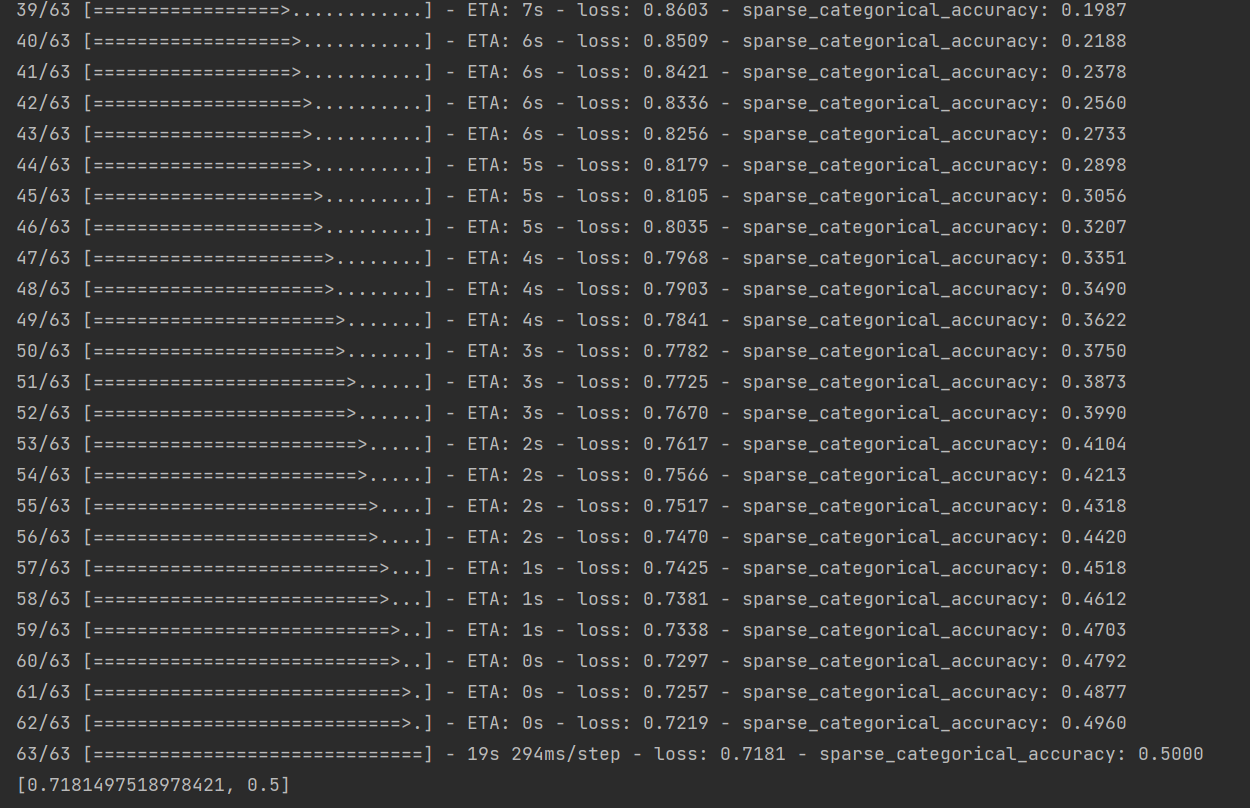
@Chenfanqing 我不知道你写了怎样的代码,但你这里展示的似乎是一个训练的过程?evaluate是不会更新参数,但训练过程会更新参数,当然是随着训练batch数的增加,loss逐渐下降, accuracy逐渐上升。如果还有疑问,可以发一下你的代码。

在这个实例中,总是报错
tensorflow.python.framework.errors_impl.InvalidArgumentError: 2 root error(s) found.
(0) Invalid argument: Trying to decode BMP format using a wrong op. Use decode_bmp or decode_image instead. Op used: DecodeJpeg
[[{{node DecodeJpeg}}]]
[[IteratorGetNext]]
[[IteratorGetNext/_2]]
(1) Invalid argument: Trying to decode BMP format using a wrong op. Use decode_bmp or decode_image instead. Op used: DecodeJpeg
[[{{node DecodeJpeg}}]]
[[IteratorGetNext]]
0 successful operations.
0 derived errors ignored. [Op:__inference_train_function_730]
Function call stack:
train_function → train_function
请问有什么方法可以跳过这些出错的照片吗
你可能需要发一下你的代码


这里给出的profiler用法已经比较老了,profiler提供的很多功能头用不了,最新的profiler功能可以用下面这种方法:
tf.profiler.experimental.start(log_dir) #训练开始前执行
for b in range(batch):
    with tf.profiler.experimental.Trace(name='自定义名字',step_num=b):
        #你的训练代码
tf.profiler.experimental.stop() #训练结束后执行,保存profile数据

请问我的graph显示不出结构图是什么原因呢
import tensorflow as tf
import numpy as np
class MNISTLoader():
    def __init__(self):
        mnist = tf.keras.datasets.mnist
        (self.train_data, self.train_label), (self.test_data, self.test_label) = mnist.load_data()
        # MNIST中的图像默认为uint8(0-255的数字)。以下代码将其归一化到0-1之间的浮点数,并在最后增加一维作为颜色通道
        self.train_data = np.expand_dims(self.train_data.astype(np.float32) / 255.0, axis=-1)      # [60000, 28, 28, 1]
        self.test_data = np.expand_dims(self.test_data.astype(np.float32) / 255.0, axis=-1)        # [10000, 28, 28, 1]
        self.train_label = self.train_label.astype(np.int32)    # [60000]
        self.test_label = self.test_label.astype(np.int32)      # [10000]
        self.num_train_data, self.num_test_data = self.train_data.shape[0], self.test_data.shape[0]

    def get_batch(self, batch_size):
        # 从数据集中随机取出batch_size个元素并返回
        index = np.random.randint(0, self.num_train_data, batch_size)
        return self.train_data[index, :], self.train_label[index]
class MLP(tf.keras.Model):
    def __init__(self):
        super().__init__()
        self.flatten = tf.keras.layers.Flatten()    # Flatten层将除第一维(batch_size)以外的维度展平
        self.dense1 = tf.keras.layers.Dense(units=100, activation=tf.nn.relu)
        self.dense2 = tf.keras.layers.Dense(units=10)

    @tf.function
    def call(self, inputs):         # [batch_size, 28, 28, 1]
        x = self.flatten(inputs)    # [batch_size, 784]
        x = self.dense1(x)          # [batch_size, 100]
        x = self.dense2(x)          # [batch_size, 10]
        output = tf.nn.softmax(x)
        return output
num_epochs = 5
batch_size = 50
learning_rate = 0.001
model = MLP()
data_loader = MNISTLoader()
optimizer = tf.keras.optimizers.Adam(learning_rate=learning_rate)
summary_writer = tf.summary.create_file_writer('./tensorboard')     # 参数为记录文件所保存的目录
#num_batches = int(data_loader.num_train_data // batch_size * num_epochs)
tf.summary.trace_on(graph=True, profiler=True)  # 开启Trace,可以记录图结构和profile信息

num_batches = 5
for batch_index in range(num_batches):
    X, y = data_loader.get_batch(batch_size)
    with tf.GradientTape() as tape:
        y_pred = model(X)
        loss = tf.keras.losses.sparse_categorical_crossentropy(y_true=y, y_pred=y_pred)
        loss = tf.reduce_mean(loss)
        print("batch %d: loss %f" % (batch_index, loss.numpy()))
    grads = tape.gradient(loss, model.variables)
    optimizer.apply_gradients(grads_and_vars=zip(grads, model.variables))
    with summary_writer.as_default():                               # 希望使用的记录器
        tf.summary.scalar("loss", loss, step=batch_index)

with summary_writer.as_default():
    tf.summary.trace_export(name="model_trace", step=0, profiler_outdir = './tensorboard')    # 保存Trace信息到文件
sparse_categorical_accuracy = tf.keras.metrics.SparseCategoricalAccuracy()
num_batches = int(data_loader.num_test_data // batch_size)
for batch_index in range(num_batches):
    start_index, end_index = batch_index * batch_size, (batch_index + 1) * batch_size
    y_pred = model.predict(data_loader.test_data[start_index: end_index])
    sparse_categorical_accuracy.update_state(y_true=data_loader.test_label[start_index: end_index], y_pred=y_pred)
print("test accuracy: %f" % sparse_categorical_accuracy.result())